
Overview
Panel Analytics is a weekly performance summary that the platform generates for each agent and shows directly on their record. Instead of a raw table of scores, it reads like a short review: what went well, what slipped, and what to focus on next — written in plain language, backed by the agent’s actual call data.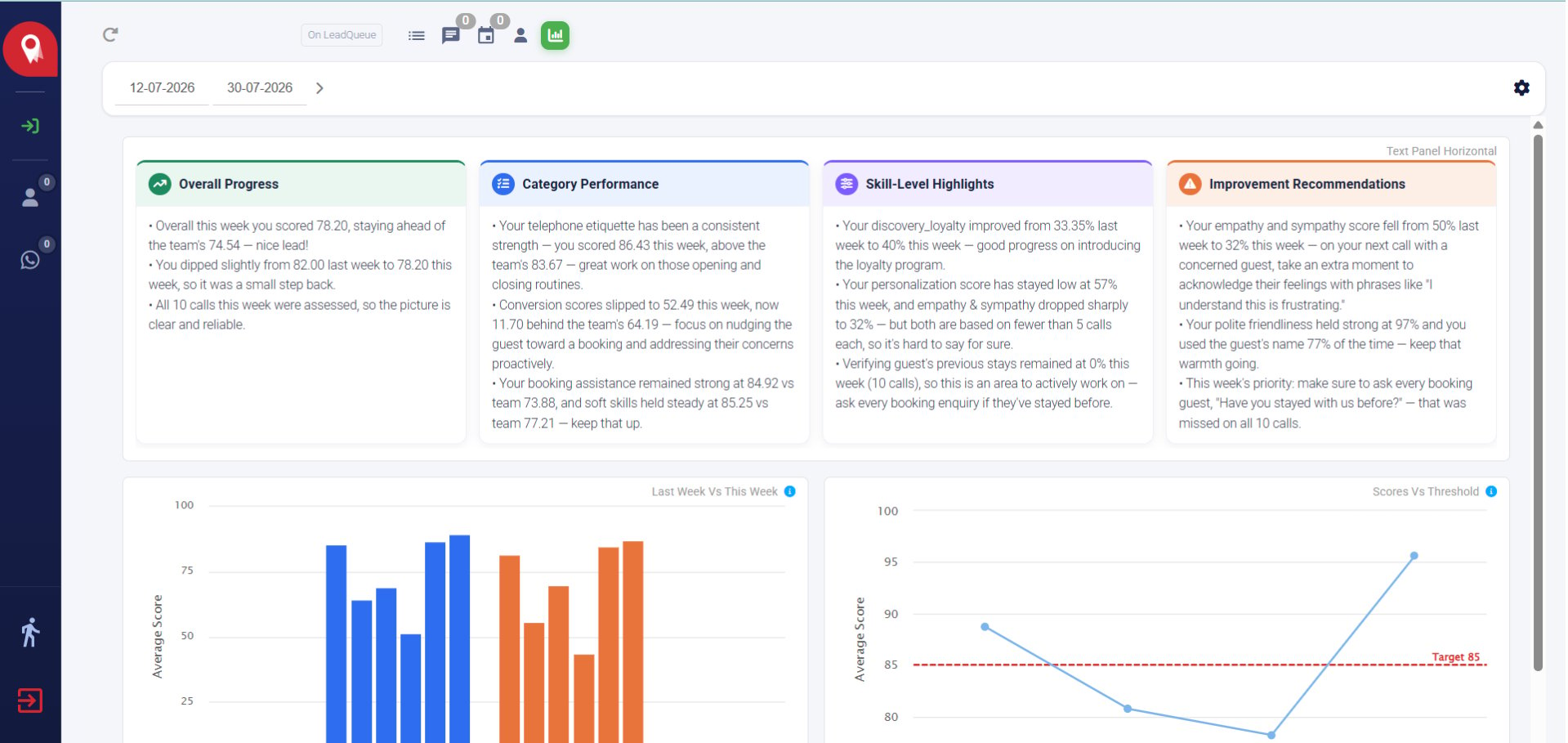
Panel Analytics on an agent's record
- Supervisors and coaches, who want a fast read on how an agent’s week went without digging through raw scores
- Agents, reviewing their own performance and recommendations
How it works
Once a week, the platform looks at every call an agent handled and scores it against the assessment rubric. Each agent’s scores are then compared two ways:- Against their peers — how this agent did this week relative to the rest of the team
- Against their own history — how this week compares to their own past performance
When it updates
The analysis refreshes automatically once a week, covering that week’s calls.- Agents with enough call volume get their update right away.
- Agents with very few calls that week get a short grace period before their update generates, so there’s enough evidence behind the analysis.
If an agent’s panel hasn’t updated yet, it may simply be within this grace period rather than reflecting an error.
Reading the panel
The panel has two parts: four summary cards at the top, and two charts below them.Overall Progress
A quick take on the agent’s week as a whole — their score compared to the team average, how it moved from last week, and how many calls the assessment is based on. More calls behind the score means a more reliable read.Category Performance
Breaks the week down by category — things like telephone etiquette, conversion, booking assistance, and soft skills — each compared against the team average for that same category. This is the fastest way to spot which category is pulling the overall score up or down.Skill-Level Highlights
Zooms in further, to specific skills within those categories — for example, personalization, empathy, or verifying a guest’s history. Skills based on very few calls are flagged as such, since a single call can swing a small sample a lot.Improvement Recommendations
The most actionable card. Each recommendation ties a specific behavior to a concrete next step — often with an example phrase the agent can use on their next call — and calls out the single highest-priority thing to work on this week.Last Week vs. This Week
A side-by-side bar chart comparing this week’s metrics against last week’s, across all the scored categories. Use the legend below the chart to toggle which metrics are shown — there’s more than one page of metrics, so check for the page indicator if you’re looking for one that isn’t visible yet.Scores vs. Threshold
A trend line tracking a chosen metric over several weeks against a target line (for example, a target score of 85). Hover over any point to see the exact score, the week it covers, and how much it changed from the previous week — useful for spotting whether an agent is trending toward the target or drifting away from it.A few things to know
- A score with a caveat (for example, “based on fewer than 5 calls”) means there isn’t much data behind it yet — treat it as an early signal, not a final verdict.
- A delayed update for an agent usually just means they were below the weekly call threshold and are in their grace period, not that something went wrong.